Contents
Everything that is inside.
The full table of contents, so you know exactly what you are buying.
Every chapter in the guide. Search the full contents with page numbers →
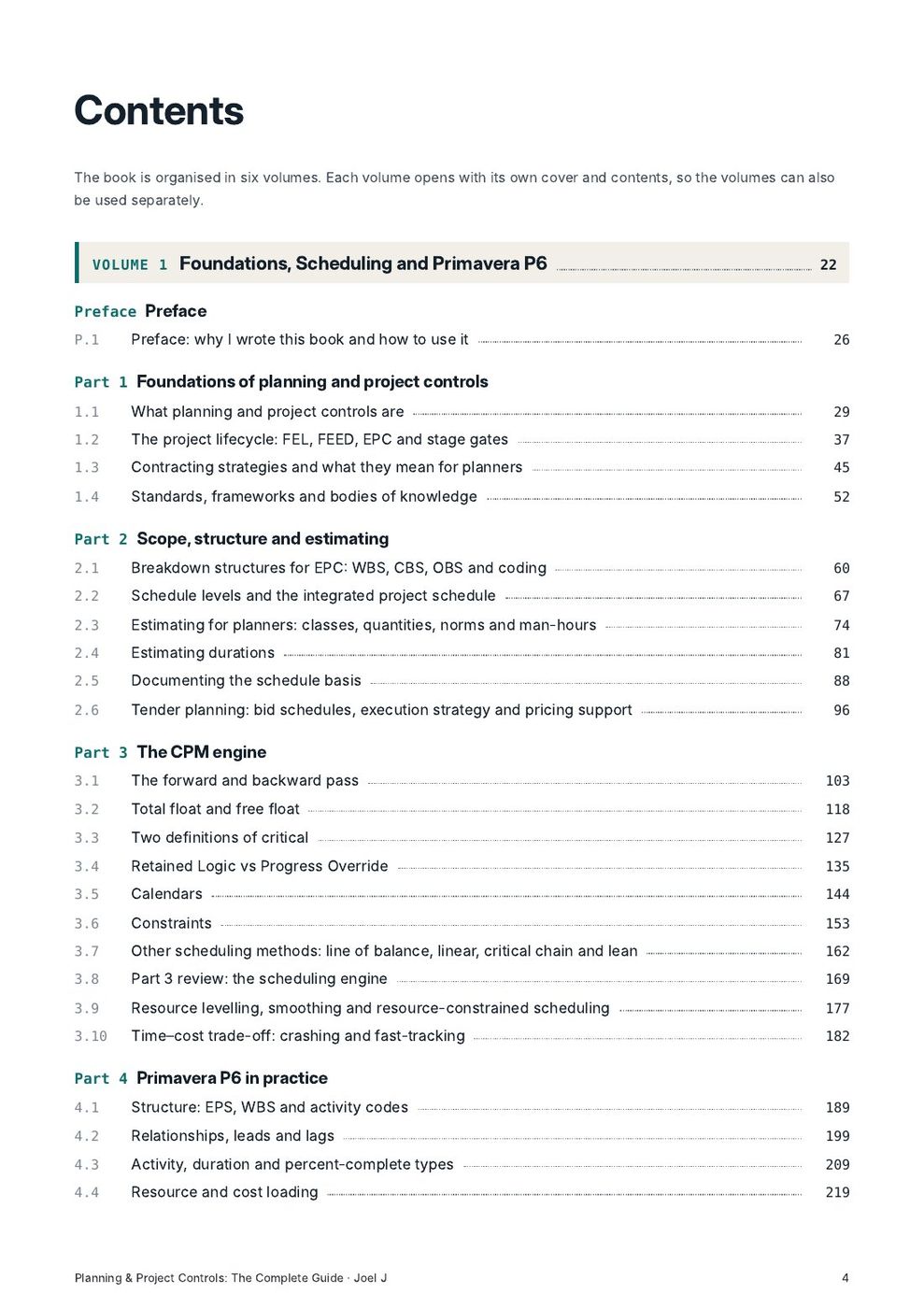
Volume 1: Foundations, Scheduling and Primavera P655
Preface
- P.1 Preface: why I wrote this book and how to use it
Foundations of planning and project controls
- 1.1 What planning and project controls are
- 1.2 The project lifecycle: FEL, FEED, EPC and stage gates
- 1.3 Contracting strategies and what they mean for planners
- 1.4 Standards, frameworks and bodies of knowledge
Scope, structure and estimating
- 2.1 Breakdown structures for EPC: WBS, CBS, OBS and coding
- 2.2 Schedule levels and the integrated project schedule
- 2.3 Estimating for planners: classes, quantities, norms and man-hours
- 2.4 Estimating durations
- 2.5 Documenting the schedule basis
- 2.6 Tender planning: bid schedules, execution strategy and pricing support
The CPM engine
- 3.1 The forward and backward pass
- 3.2 Total float and free float
- 3.3 Two definitions of critical
- 3.4 Retained Logic vs Progress Override
- 3.5 Calendars
- 3.6 Constraints
- 3.7 Other scheduling methods: line of balance, linear, critical chain and lean
- 3.8 Part 3 review: the scheduling engine
- 3.9 Resource levelling, smoothing and resource-constrained scheduling
- 3.10 Time–cost trade-off: crashing and fast-tracking
Primavera P6 in practice
- 4.1 Structure: EPS, WBS and activity codes
- 4.2 Relationships, leads and lags
- 4.3 Activity, duration and percent-complete types
- 4.4 Resource and cost loading
- 4.5 Baselines and archiving
- 4.6 The update cycle
- 4.7 The P6 power-user toolkit
- 4.8 Part 4 checkpoint: build and update a training schedule
- 4.9 P6 setup and administration: database, security, global data and preferences
- 4.10 Scheduling options and calendars in depth
- 4.11 Constraints, float and the critical path in P6
- 4.12 Updating in P6 step by step
- 4.13 Common P6 problems during execution and updating: diagnosis and fixes
- 4.14 Change control, revisions and baseline management in P6
- 4.15 Multi-project scheduling, contractor schedules and XER handling
- 4.16 Reporting from P6: layouts, printing, exports and visual tools
- 4.17 Other scheduling and schedule analysis tools
- 4.18 P6 interview questions and practical tests
Planning EPC projects phase by phase
- 5.1 Engineering planning and control
- 5.2 Procurement planning, expediting and material control
- 5.3 Fabrication planning: spools, steel and modules
- 5.4 Construction planning and sequencing
- 5.5 Advanced Work Packaging
- 5.6 Mechanical completion, commissioning and handover
- 5.7 Shutdowns, turnarounds and brownfield work
- 5.8 Interface management
- 5.9 Look-ahead planning and short-interval control
- 5.10 Building an integrated EPC schedule: a worked example
Schedule quality and assurance
- 6.1 DCMA 14-point assessment, part 1
- 6.2 DCMA 14-point assessment, part 2
- 6.3 GAO's ten best practices
- 6.4 Horizontal and vertical traceability
- 6.5 Writing a health-check report
- 6.6 Part 6 review: schedule quality
Volume 2: Progress, Cost, Risk, Contracts and Delay87
Progress measurement and performance
- 7.1 Rules of credit and progress measurement
- 7.2 Overall EPC progress: weighting engineering, procurement and construction
- 7.3 Earned value basics
- 7.4 Earned schedule
- 7.5 S-curves, asking rates and forecast credibility
- 7.6 Forecasting completion three ways
- 7.7 Manpower, productivity and labour planning
- 7.8 Part 7 review: progress, EV and forecasting
Cost control and integration
- 8.1 Cost control fundamentals: budgets, commitments, forecasts and contingency
- 8.2 Integrated cost and schedule control
- 8.3 Cash flow and financial forecasting
- 8.4 Change and trend management
Schedule risk analysis
- 9.1 Why schedules need risk analysis
- 9.2 Three-point estimates and distributions
- 9.3 Risk events
- 9.4 Running Monte Carlo
- 9.5 Risk drivers and contingency
- 9.6 Presenting risk results
- 9.7 Part 9 review: package the SRA
- 9.8 Reference class forecasting, optimism bias and the psychology of planning
- 9.9 Integrated cost and schedule risk analysis and contingency management
Reporting and communication
- 10.1 The progress report narrative
- 10.2 Visual reporting
- 10.3 Executive reporting
- 10.4 Stakeholder management
- 10.5 Dashboards and project controls KPIs
- 10.6 Planning workshops, facilitation and influence
Data, tools and automation
- 11.1 Inside the XER file
- 11.2 Exporting to Excel and reviewing data
- 11.3 Python basics for schedulers
- 11.4 Automated health check
- 11.5 Comparing updates automatically
- 11.6 Part 11 review: package your tools
- 11.7 Digital project controls: 4D/5D BIM, data platforms and AI
Contracts, notices and claims
- 12.1 FIDIC 2017 structure
- 12.2 Clause 8: programme, extension of time and delay damages
- 12.3 Clause 20: notices, claims and time bars
- 12.4 Clause 13: variations and their time effect
- 12.5 Disputes and the DAAB
- 12.6 Local law and enforceability
- 12.7 Other contract forms: NEC4, national oil company contracts and subcontracts
- 12.8 Writing and managing claims
- 12.9 Part 12 review: one event from start to finish
Delay analysis
- 13.1 Delay types
- 13.2 Cause and effect
- 13.3 Concurrency and pacing
- 13.4 Float ownership
- 13.5 The AACE RP 29R-03 taxonomy
- 13.6 Records and the SCL Protocol
- 13.7 Legal principles and landmark cases
- 13.8 Review: delay fundamentals
- 13.9 What a TIA is
- 13.10 Designing a fragnet
- 13.11 Preparing the base update
- 13.12 Running the TIA and reading the result
- 13.13 Concurrency, mitigation and acceleration in a TIA
- 13.14 Writing the TIA narrative
- 13.15 Review: stress-test the TIA
- 13.16 As-planned vs as-built
- 13.17 Impacted as-planned
- 13.18 Collapsed as-built
- 13.19 Windows analysis
- 13.20 Attributing delay in each window
- 13.21 Choosing and defending a method
- 13.22 Delay analysis in P6: hands-on techniques
- 13.23 A full forensic case study
- 13.24 Review: the windows analysis report
- 13.25 The expert witness: duties, reports and giving evidence
Disruption and quantum
- 14.1 Delay vs disruption
- 14.2 The measured mile
- 14.3 Other productivity methods
- 14.4 Prolongation costs
- 14.5 Head office overheads
- 14.6 Acceleration costs
- 14.7 Part 14 review: disruption and quantum
Strategic project controls
- 15.1 Recovery planning
- 15.2 Benchmarks and lessons learned
- 15.3 Owner's and PMC project controls
- 15.4 Portfolio and programme controls
- 15.5 Part 15 review: the executive brief
The planner's career
- 16.1 Assemble the portfolio
- 16.2 The CV
- 16.3 LinkedIn and visibility
- 16.4 Technical interview preparation
- 16.5 Case interview and presentation
- 16.6 Certifications and continuing professional development
- 16.7 Professional ethics for planners
Volume 3: Industries and Primavera P6 in Depth161
Planning across industries
- 17.1 How planning changes from one industry to another
- 17.2 Onshore cross-country pipelines
- 17.3 Offshore oil and gas: platforms, subsea, pipelay and hook-up
- 17.4 Power generation and renewables
- 17.5 Buildings, high-rise and fit-out
- 17.6 Roads and highways
- 17.7 Bridges, tunnels and marine works
- 17.8 Rail, metro and transit systems
- 17.9 Shipbuilding and new vessel construction
- 17.10 Ship repair, dry-docking and conversions
- 17.11 Pressure vessels, heat exchangers and storage tanks
- 17.12 Water, wastewater and desalination
- 17.13 Mining and mineral processing
- 17.14 Maintenance planning and operations
- 17.15 Industry quick reference: rates, milestones and risks
- 17.16 In depth: onshore oil and gas EPC
- 17.17 In depth: offshore fixed platforms
- 17.18 In depth: subsea developments and FPSOs
- 17.19 In depth: cross-country pipelines
- 17.20 In depth: LNG projects
- 17.21 In depth: brownfield modifications and turnarounds
- 17.22 In depth: combined-cycle and thermal power plants
- 17.23 In depth: solar, wind and battery storage
- 17.24 In depth: high-rise and complex buildings
- 17.25 In depth: roads and highways
- 17.26 In depth: bridges, tunnels and metro
- 17.27 In depth: ports, marine and dredging
- 17.28 In depth: water, wastewater and desalination
- 17.29 In depth: mining and mineral processing
- 17.30 In depth: shipbuilding and ship repair
- 17.31 In depth: data centres
- 17.32 In depth: pharmaceutical and life-science facilities
- 17.33 In depth: telecom networks
- 17.34 Comparing industries: what changes and what stays the same
Primavera P6 complete guide, screen by screen
- 18.1 Getting started: products, the database and the P6 window
- 18.2 Enterprise setup: EPS, OBS, users, security and Admin Preferences
- 18.3 Creating a project and setting Project Details
- 18.4 The WBS window: building and maintaining the WBS
- 18.5 Calendars in P6: global, project and resource
- 18.6 Activities: creating, editing and the Activity Details tabs
- 18.7 Activity codes and user-defined fields
- 18.8 Relationships: adding, editing and tracing logic
- 18.9 Constraints, expected finish and notebooks in practice
- 18.10 Scheduling: the Schedule dialog, options and the schedule log
- 18.11 Resources and roles: dictionary, assignments, units and curves
- 18.12 Costs: cost accounts, expenses, prices and budgets
- 18.13 Resource analysis and levelling in P6
- 18.14 Baselines in P6: maintaining, assigning and comparing
- 18.15 Layouts: columns, bars, group and sort, filters and timescale
- 18.16 Updating in P6 screen by screen
- 18.17 Earned value in P6
- 18.18 Global Change: bulk edits safely
- 18.19 Import and export: XER, XML, spreadsheets and Microsoft Project
- 18.20 Printing, reports and publishing
- 18.21 Claim Digger, schedule comparison and Check Schedule
- 18.22 Critical path workflows: longest path, float paths and near-critical analysis
- 18.23 Thresholds, issues, risks, documents and other project windows
- 18.24 P6 EPPM (web), Visualizer and team collaboration
- 18.25 Speed, shortcuts and working efficiently in P6
- 18.26 Scenario A: building a project from scratch, step by step
- 18.27 Scenario B: a monthly update with problems to solve
- 18.28 Scenario C: a time impact analysis in P6, step by step
- 18.29 Scenario D: recovery planning with what-if schedules
- 18.30 Scenario E: reviewing a contractor's XER submission
- 18.31 Activity steps, step templates and weighted progress
- 18.32 Roles, rates, resource shifts and assignment details
- 18.33 Investigating a schedule: twenty layouts that answer common questions
- 18.34 P6 troubleshooting gallery: fifteen cases with screens
- 18.35 Preparing P6 data for delay analysis and claims
WBS templates and activity sequences by industry
- 19.1 Onshore oil and gas process plant (EPC)
- 19.2 Piping spool fabrication shop project
- 19.3 Onshore cross-country pipeline
- 19.4 Offshore fixed platform: jacket, topsides and hook-up
- 19.5 Combined-cycle power plant
- 19.6 Utility-scale solar PV and battery storage
- 19.7 High-rise building
- 19.8 Road and highway
- 19.9 Bridge (segmental viaduct)
- 19.10 Bored tunnel and metro station
- 19.11 Rail and metro systems
- 19.12 Shipbuilding (new vessel)
- 19.13 Ship repair and dry-docking
- 19.14 Storage tank farm
- 19.15 Pressure vessel and heat exchanger fabrication
- 19.16 Desalination plant (reverse osmosis)
- 19.17 Refinery or gas plant turnaround
- 19.18 Substation and overhead transmission line
- 19.19 Mineral processing plant
- 19.20 Brownfield plant modification and tie-ins
Productivity norms and KPI reference
- 20.1 Using norms: units, factors and calibration
- 20.2 Engineering: deliverable hours and durations
- 20.3 Procurement lead times by equipment type
- 20.4 Civil and concrete norms
- 20.5 Structural steel norms
- 20.6 Piping norms: shop and field
- 20.7 Mechanical equipment norms
- 20.8 Electrical and instrumentation norms
- 20.9 Insulation, painting, fireproofing and scaffolding
- 20.10 Pipelines, tanks and vessels: norms
- 20.11 Buildings and infrastructure norms
- 20.12 Shipyard, ship repair and marine norms
- 20.13 Completions and commissioning norms
- 20.14 The KPI dictionary
- 20.15 KPIs by industry
- 20.16 Manpower ratios, densities and rules of thumb
Interview mastery
- 21.1 How planning interviews work and how to prepare
- 21.2 Question bank: CPM and scheduling fundamentals
- 21.3 Question bank: Primavera P6
- 21.4 Question bank: EPC planning, progress and earned value
- 21.5 Question bank: contracts, claims and delay analysis
- 21.6 Question bank: risk, reporting, leadership and data
- 21.7 Scenario and case questions with worked answers
- 21.8 Behavioural questions and model STAR answers
- 21.9 Practical test papers with solutions
- 21.10 Questions to ask, offers and the first 90 days in a new role
- 21.11 Question bank: industry-specific interviews
- 21.12 Question bank: advanced P6, data and forensic techniques
- 21.13 Question bank: planning lead and controls manager interviews
Know your field: the disciplines planners work with
- 22.1 Who does what on an EPC project
- 22.2 Engineering disciplines and their deliverables
- 22.3 Piping for planners: from P&ID to test pack
- 22.4 Welding and NDT for planners
- 22.5 QA/QC: inspection, test plans and records
- 22.6 HSE and permits to work
- 22.7 Materials management for planners
- 22.8 Document control, technical queries and change management
- 22.9 Construction methods, cranes and heavy lifts
- 22.10 Commissioning in depth
- 22.11 Procurement and commercial terms planners should know
- 22.12 Estimating basics for planners
- 22.13 Project management processes and governance
- 22.14 Site records and contract administration
- 22.15 Operations, handover and the operating phase
- 22.16 Planning in the Gulf: local practice and conditions
Case studies
- 23.1 Case: the gas plant that reported green
- 23.2 Case: piping productivity collapse and recovery
- 23.3 Case: pipeline spread and right-of-way access
- 23.4 Case: offshore topsides and the installation window
- 23.5 Case: the turnaround that overran
- 23.6 Case: metro systems integration slip
- 23.7 Case: high-rise façade delay and takt recovery
- 23.8 Case: dry-docking with major steel growth
- 23.9 Case: the contractor XER with hidden constraints
- 23.10 Case: an EOT claim under FIDIC from event to agreement
- 23.11 Case: the valve and the access (concurrency dispute)
- 23.12 Case: proving disruption with a measured mile
- 23.13 Case: crashing a power plant commissioning programme
- 23.14 Case: the risk analysis that moved FID
- 23.15 Case: setting up planning on a new project
Workbook: problems with full solutions
- 24.1 Workbook: CPM, float and critical path
- 24.2 Workbook: calendars, constraints and progress
- 24.3 Workbook: durations, norms and manpower
- 24.4 Workbook: progress and earned value
- 24.5 Workbook: forecasting, S-curves and asking rates
- 24.6 Workbook: crashing, levelling and line of balance
- 24.7 Workbook: risk, PERT and contingency
- 24.8 Workbook: delay analysis and concurrency
- 24.9 Workbook: disruption, quantum and cash
- 24.10 Workbook: mixed interview problems
- 24.11 Workbook: norms, estimating and resource loading
- 24.12 Workbook: P6 scenario problems
Volume 4: The Schedule Library58
Schedule library: complete industry schedules with logic
- 25.1 Relationship types, lags and logic patterns: the planner's field reference
- 25.2 How to read and use the schedule library
- 25.3 Onshore gas processing plant EPC: Level 3 schedule
- 25.4 Engineering deliverables schedule: Level 4 with review cycles
- 25.5 Procurement schedule: fifteen packages from requisition to site
- 25.6 Piping spool fabrication shop schedule
- 25.7 Piping erection and test package schedule
- 25.8 Mechanical equipment installation: static and rotating
- 25.9 Electrical and instrumentation construction schedule
- 25.10 Pre-commissioning, commissioning and start-up by system
- 25.11 Storage tank farm (API 650 tanks)
- 25.12 Cross-country pipeline: spread schedule with ladder logic
- 25.13 HDD crossing and tie-ins
- 25.14 Offshore platform: detailed jacket and topsides schedule
- 25.15 Plant turnaround: hour-by-hour critical path
- 25.16 Brownfield revamp: SIMOPS, hot taps and a tie-in shutdown (detailed)
- 25.17 Combined-cycle gas turbine (CCGT) power plant: detailed schedule
- 25.18 Utility-scale solar PV plant (200 MWp)
- 25.19 Onshore wind farm (16 turbines)
- 25.20 High-voltage substation (132/33 kV): detailed schedule
- 25.21 Overhead transmission line (100 towers)
- 25.22 High-rise residential tower (24 floors)
- 25.23 Villa compound (12 villas)
- 25.24 Hospital: MEP-intensive building
- 25.25 Steel-framed warehouse (pre-engineered building)
- 25.26 Data centre (8 MW IT): detailed schedule with five commissioning levels
- 25.27 Dual carriageway highway (18 km): detailed schedule
- 25.28 Highway bridge (6 spans, precast girders)
- 25.29 Bored tunnel with TBM (4 km): detailed schedule
- 25.30 Metro station (top-down cut and cover): detailed schedule
- 25.31 Railway track, OLE and signalling
- 25.32 Water treatment plant: detailed schedule
- 25.33 Sewer network with open cut and microtunnelling
- 25.34 Port quay wall and container berth
- 25.35 Dredging and land reclamation
- 25.36 Airport runway (4 km): detailed schedule
- 25.37 Shipbuilding: block construction to delivery
- 25.38 Dry-dock ship repair (in hours)
- 25.39 FPSO conversion: detailed schedule
- 25.40 Structural steel fabrication shop
- 25.41 Pressure vessel fabrication (ASME VIII)
- 25.42 Power station boiler outage (in hours): detailed schedule
- 25.43 Mining project: mine development and concentrator (detailed)
- 25.44 Telecom network rollout (96 sites)
- 25.45 Office fit-out (three floors)
- 25.46 Concrete gravity dam: detailed schedule by block and lift
- 25.47 Seawater reverse osmosis desalination plant: detailed schedule
- 25.48 Pharmaceutical sterile facility: detailed construction and qualification schedule
- 25.49 Onshore well hook-up, flowlines and remote manifold
- 25.50 Subsea pipeline and riser installation
- 25.51 FEED phase schedule
- 25.52 EPC tender (bid) schedule
- 25.53 LNG liquefaction train
- 25.54 Full-containment LNG storage tank
- 25.55 Carbon capture and storage (capture, compression, pipeline, injection)
- 25.56 Ammonia plant (steam methane reforming)
- 25.57 District cooling plant and network
- 25.58 Artificial island for offshore field development
Volume 5: Advanced Practice and Reference125
Advanced cost control and earned value
- 26.1 Cost control architecture: CBS, control accounts and work packages
- 26.2 From estimate to control budget: classes, basis of estimate and the performance baseline
- 26.3 Contingency: sizing, drawdown and governance
- 26.4 Commitments, accruals, incurred cost and VOWD
- 26.5 The monthly cost report: structure, reconciliation and narrative
- 26.6 Earned value management systems: ANSI-748 in practice
- 26.7 EV metrics at expert level: earned schedule, TCPI and independent EACs
- 26.8 Forecasting EAC bottom-up: quantities, productivity, rates and indirects
- 26.9 Change, trends and early warning: controlling scope growth
- 26.10 Indirect costs, time-related costs and prolongation
- 26.11 Cash flow, payment terms and working capital
- 26.12 Productivity and unit rate analysis for cost control
- 26.13 Cost control by contract type and by role
- 26.14 Cost in P6 and ERP integration (SAP, Oracle)
- 26.15 Common cost control mistakes, and how experienced controllers avoid them
- 26.16 Question bank: cost control and project controls interviews
- 26.17 Worked case: the month-12 cost and schedule report of an EPC project
- 26.18 Estimating methods for cost engineers and planners
Microsoft Project for planners
- 27.1 Microsoft Project and P6: where each fits and how the concepts map
- 27.2 Setting up MS Project correctly: the options that matter
- 27.3 Task types, effort-driven scheduling and the work formula
- 27.4 Logic, lags, constraints, deadlines and the critical path in MSP
- 27.5 Resources, assignments and levelling in MSP
- 27.6 Baselines, status date and updating in MSP
- 27.7 Earned value, custom fields and reporting in MSP
- 27.8 Moving schedules between MS Project and P6
- 27.9 Reviewing an MS Project schedule submission
- 27.10 MS Project mistakes, power tips and interview questions
- 27.11 Lab: build, update and review the same project in MS Project
Primavera P6 at expert level
- 28.1 How the P6 scheduler really works
- 28.2 Multiple float path analysis and longest path in depth
- 28.3 Out-of-sequence progress: retained logic, progress override and actual dates, worked example
- 28.4 Calendars at expert level: hours, mixed calendars and float distortion
- 28.5 Percent complete, units and earned value mechanics in P6
- 28.6 Global Change at expert level: formulas, conditions and safe use
- 28.7 Bulk updating with Excel, UDFs and indicators
- 28.8 The P6 database: tables, fields and SQL for analysis
- 28.9 XER files: anatomy and analysis with Python
- 28.10 Schedule health at expert level: beyond the DCMA checks
- 28.11 Recovery and acceleration modelling in P6
- 28.12 Large, multi-project and programme schedules in P6
- 28.13 Baseline management at expert level
- 28.14 Resource levelling at expert level
- 28.15 Schedule risk analysis from P6: QSRA workflow and tools
- 28.16 Twenty expert P6 puzzles with solutions
- 28.17 Expert P6 interview and practical test
- 28.18 Coding standards and a template library for P6
- 28.19 P6 EPPM: web features, portfolios and team collaboration
- 28.20 Resource-dependent activities, shifts and 24/7 work
- 28.21 Reporting automation from P6: Excel, Power BI and scripts
- 28.22 P6 administration settings an expert must know
- 28.23 Writing a P6 schedule specification for contractors
- 28.24 Building a baseline from scratch: the professional process
- 28.25 Lab 1: build and schedule a project from scratch
- 28.26 Lab 2: monthly update with out-of-sequence progress
- 28.27 Lab 3: time impact analysis with a fragnet
- 28.28 Lab 4: resource loading, levelling and earned value
- 28.29 Activity types in depth: behaviour, traps and correct use
- 28.30 Duration types in depth: Fixed Duration, Units, Units/Time with worked numbers
- 28.31 P6 for advanced work packaging (AWP)
Field notes: what goes wrong in each industry
- 29.1 Field notes: onshore oil and gas EPC
- 29.2 Field notes: engineering phase
- 29.3 Field notes: procurement and vendors
- 29.4 Field notes: fabrication shops (spools, steel, vessels)
- 29.5 Field notes: piping and mechanical construction
- 29.6 Field notes: E&I, completions and commissioning
- 29.7 Field notes: pipelines
- 29.8 Field notes: offshore
- 29.9 Field notes: turnarounds and brownfield
- 29.10 Field notes: power and renewables
- 29.11 Field notes: buildings and fit-out
- 29.12 Field notes: roads, bridges and infrastructure
- 29.13 Field notes: tunnels, metro and rail
- 29.14 Field notes: marine, ports and dredging
- 29.15 Field notes: shipbuilding and ship repair
- 29.16 Field notes: water, desalination and mining
- 29.17 Field notes: forty mistakes planners make, across all industries
How projects actually run: phase by phase
- 30.1 How an onshore EPC project runs, from award to handover
- 30.2 How a cross-country pipeline project runs
- 30.3 How a high-rise building project runs
- 30.4 How a plant turnaround is prepared and executed
- 30.5 How a shipyard new-build and a dry-docking run
- 30.6 How a power or renewable project runs
- 30.7 How an offshore project runs: yard to first oil
- 30.8 How the owner's and PMC planner works
- 30.9 A working week of a site planner
- 30.10 Model documents: narratives, notices and reports planners write
Situations: what an experienced planner does
- 31.1 Situations with managers and clients
- 31.2 Situations with progress, data and updates
- 31.3 Situations with delays, changes and claims
- 31.4 Situations in your career and team
- 31.5 Situations at the engineering and procurement interfaces
- 31.6 Situations in completions, commissioning and handover
Final exams and mock interviews
- 32.1 Final exam A: scheduling, Primavera P6 and MS Project
- 32.2 Final exam B: progress, cost control, risk, contracts and delay
- 32.3 Mock interviews: three full transcripts with model answers
Primavera P6 mastery: procedures, field dictionary and labs
- 33.1 P6 procedures: enterprise and project set-up
- 33.2 P6 procedures: WBS, activities, relationships and codes
- 33.3 P6 procedures: scheduling, baselines and updating
- 33.4 P6 procedures: resources, costs, earned value and levelling
- 33.5 P6 procedures: layouts, filters, groupings and reports
- 33.6 P6 procedures: import, export, Claim Digger, Global Change and admin checks
- 33.7 Field dictionary: dates, durations and float
- 33.8 Field dictionary: progress, units, costs and earned value
- 33.9 Field dictionary: relationships, codes, calendars and project fields
- 33.10 Lab 5: contemporaneous windows analysis across two updates
- 33.11 Lab 6: half-step (bifurcated) update
- 33.12 Lab 7: resource levelling by hand and in P6
- 33.13 Lab 8: earned value from a cost-loaded schedule
- 33.14 Lab 9: calendars and lag calendars
- 33.15 Lab 10: retained logic versus progress override, calculated
- 33.16 Lab 11: time impact analysis with concurrent delays
- 33.17 P6 procedures: delay analysis techniques step by step
- 33.18 P6 procedures: reviewing a contractor XER submission
- 33.19 P6 procedures: the complete monthly update, start to finish
- 33.20 P6 procedures: EPPM, Team Member progress and portfolio views
- 33.21 P6 procedures: risks, issues, thresholds and documents in P6
- 33.22 Field dictionary: resources, assignments and WBS fields
- 33.23 Twenty practice networks with full solutions
Case studies from piping and fabrication projects
- 34.1 Case 1: record welding output, but the site had no workfront
- 34.2 Case 2: material release, not productivity, was driving the piping forecast
- 34.3 Case 3: erection at 70%, test packs at 25%
- 34.4 Case 4: a progress dispute over rules of credit
- 34.5 Case 5: preparing a fabrication facility for a client capacity assessment
- 34.6 Case 6: a monthly update that looked like good news
Volume 6: AI and Power BI for Planning Engineers43
AI for planning engineers
- 35.1 AI for planning engineers: what it is, what it is not, and where it fits
- 35.2 The AI toolkit for planners: assistants, copilots and specialist scheduling tools
- 35.3 Prompting for planners: patterns, templates and a prompt library
- 35.4 AI with Primavera P6: getting data out, health checks, logic review and narratives
- 35.5 AI-assisted schedule development: WBS, activities, logic, durations and fragnets
- 35.6 AI for updating and progress: comparisons, progress capture and look-aheads
- 35.7 AI for dashboards and reporting
- 35.8 Forecasting with data, machine learning and AI
- 35.9 AI for risk and decision making
- 35.10 AI for delay analysis, contracts and claims
- 35.11 Building your own AI workflows: scripts, LLM APIs, agents and automation
- 35.12 Governance, data security, ethics and implementation
- 35.13 Hands-on guides: using ChatGPT, Claude, Microsoft Copilot and Excel AI step by step
- 35.14 AI on site: progress capture, computer vision, drones, 4D BIM and digital twins
- 35.15 Prompt library: sixty prompts for planning engineers
- 35.16 Case studies: AI on planning and project controls work
- 35.17 Part 35 workshop: an AI-assisted monthly update, end to end
Power BI for planning engineers: a complete course
- 36.1 Power BI for planners: what it is, how it fits, and how this book works
- 36.2 Getting planning data into Power BI: P6, Excel trackers, SharePoint and databases
- 36.3 Power Query I: cleaning and shaping planning data
- 36.4 Power Query II: M language, parameters, folders and update snapshots
- 36.5 Data modelling for project controls: star schema, relationships and the date table
- 36.6 DAX I: measures, calculated columns, filter context and CALCULATE
- 36.7 DAX II: time intelligence and S-curves
- 36.8 DAX III: earned value, KPIs, variance against last cut-off and working days
- 36.9 Designing planning dashboards that people use
- 36.10 Lab: building the planning and progress dashboard step by step
- 36.11 Publishing and sharing: the Power BI Service, refresh, gateways, apps and security
- 36.12 Performance, quality and best practice
- 36.13 AI inside Power BI: Copilot, Q&A, smart narratives and analytical visuals
- 36.14 Advanced techniques: parameters, calculation groups, what-if, paginated reports and Python
- 36.15 Multi-project and portfolio dashboards, and reporting straight from the P6 database
- 36.16 Power BI practice workbook: exercises with full solutions
- 36.17 Measure library for project controls dashboards
- 36.18 Case study: a piping and support commodity progress dashboard
- 36.19 Power BI course capstone: assessment, interview questions and quick reference
Appendices
- A.1 Glossary
- A.2 Formula sheet
- A.3 Checklists and templates
- A.4 Standards and reading list
- A.5 Templates library
- A.6 Quick reference cards
- A.7 The planner’s library: an annotated guide to independent books and standards